How DataBridge works: a connected record, and the work built on it
DataBridge connects your sources into one record where each figure read from a file points to its source. On top of it, teams ask questions, get reports and approve drafted work.
It starts with a demo on a sample of your own documents and data.
The technical detail is in the Technical overview.
Two layers on one foundation
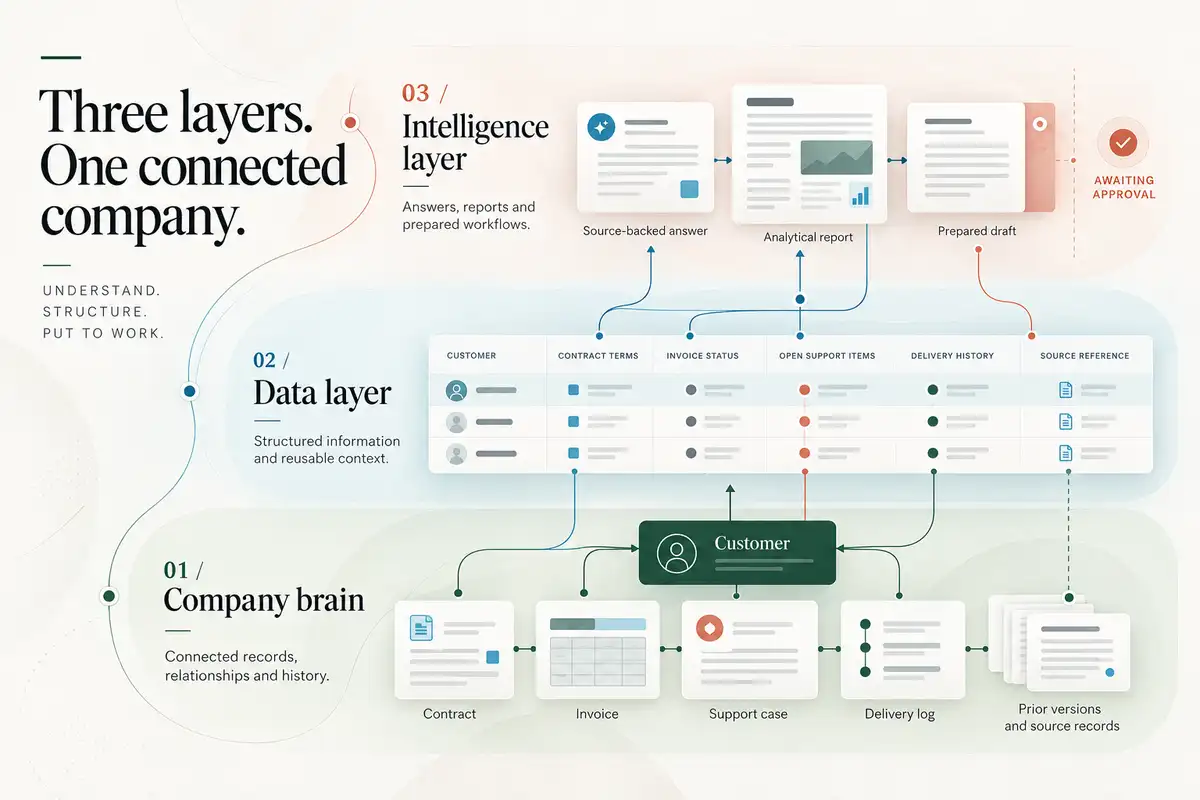
The diagram has three bands. At the base, the Company Brain: connected records, relationships and history, where a contract, an invoice, a support case, a delivery log, and prior versions and source records all link to one customer. In the middle, the data layer: structured information and reusable context, shown as a table with columns for the customer, contract terms, invoice status, open support items, delivery history and a source reference. At the top, the intelligence layer: answers, reports and prepared workflows, shown as a source-backed answer, an analytical report and a prepared draft awaiting approval. Under the heading: understand, structure, put to work.
Your machines
The intelligence layer
Questions in plain English, answered from your data with the source on every figure.
Describe the task in one sentence. DataBridge drafts the work and a person approves it.
A view of where work waits, repeats or depends on one person
Data ready for AI tools, each row linked to where it came from
The weekly report, the client pack and the handover note, assembled from current records.
The Company Brain
Reads databases, documents, spreadsheets, email and the systems your teams use.
Recognises the same customer, supplier, project or person across every source and links them into one record.
Gives each job the information in the form it needs: answers, reports, tables for analysis, and data ready for AI tools.
Each figure read from a file points to the cell, line or page it came from, and shows whether it has been checked.
Runs on your machines, with the AI model you choose. Each person sees only what their role allows.
Databases, documents, spreadsheets, email and the systems your teams already use
Company knowledge lives in a dozen places
Each team keeps its own records, in its own systems and formats.
-
Sales and customers
- Customer recordsCRM
- Email threadsShared mailbox
- ContractsSigned PDFs
-
Finance
- LedgersAccounting system
- InvoicesPDF and email
- SpreadsheetsShared drive
-
Operations
- Project docsTeam wiki
- Support ticketsHelpdesk
- Delivery logsOperations database
-
People and teams
- Meeting notesShared folders
- Handover notesPersonal folders
- PoliciesIntranet
From scattered information to one record
DataBridge connects information across your existing systems, so everything about a customer, a supplier, a project or a document sits in one record your teams can use.
-
A customer
- Customer records
- Invoices
- Support tickets
-
A supplier
- Ledgers
- Email threads
- Delivery logs
-
A project
- Project docs
- Meeting notes
- Spreadsheets
-
A document
- Policies
- Contracts
- Handover notes
Each link points back to the file it came from.
Five steps from your sources to a record you can check
-
Connect
Reads databases, documents, spreadsheets, email and the systems your teams use.
Each source connects once, and your systems carry on as they are.
-
Understand
Recognises the same customer, supplier, project or person across every source and links them into one record.
When the same customer appears in a contract, a ledger and an inbox, DataBridge recognises it and links the three into one record.
-
Convert
Gives each job the information in the form it needs: answers, reports, tables for analysis, and data ready for AI tools.
A new project starts from data that is already connected, so the sources do not have to be collected again.
-
Prove
Each figure read from a file points to the cell, line or page it came from, and shows whether it has been checked.
Your original files are never changed, so you can open the file beside the figure.
-
Protect
Runs on your machines, with the AI model you choose. Each person sees only what their role allows.
Your administrators set the roles once, and access follows each person's role from then on.
What teams get from the record
- Answers to plain-English questions, each figure linked to its file
- Drafts of routine emails and updates, held until a person approves
- A view of where work waits, repeats or depends on one person
- Data ready for AI tools, each row linked to where it came from
- Reports built from current records, each number cited
Prepare a renewal brief for Meridian Foods and draft a follow-up.
Meridian Foods Ltd
Customer · 6 sources
- Account owner
- J. Okafor, Finance
- crm-accounts.csv · r.41
- Agreed price
- S$4,180 a quarter
- quote-mar.eml
- Outstanding
- S$12,540
- ledger.xlsx · F221
- Last delivery
- 14 Aug 2026
- ops-export.csv · r.88
- Renewal date
- 31 Oct 2026
- contract-2024.pdf · p7
- Open dispute
- Carriage charge
- disputes-log.xlsx · r.12
Opened from source
Verified 14 Oct
ledger.xlsx Balances
| D Customer | E Account | F Balance | |
|---|---|---|---|
| 219 | Lumen Retail | C-1042 | 3,420 |
| 220 | Hartwell & Co | C-1047 | 0 |
| 221 | Meridian Foods Ltd | C-1051 | 12,540 |
| 222 | Orbis Supply | C-1058 | 6,880 |
Drafted follow-up
Waiting for approval
Your renewal on 31 October
Before the renewal, could we settle the open carriage charge? Happy to walk you through it this week.
Drafted from contract-2024.pdf · p7 and disputes-log.xlsx · r.12
Approve and sendEdit
- Ask in plain English.
- Each value read from a file opens to that file.
- Nothing is sent until a person approves it.
Where AI is used, and where it is not
Matching records, reconciling figures, reports and exports use ordinary software and no AI. AI helps with plain-English questions and with drafting. It is the AI you choose, and what it proposes waits for a person.
Beside the systems you already run
Your systems keep running. DataBridge reads data where it sits and feeds the tools you choose, so an old system can be retired on your own schedule.
How DataBridge compares
- Brings databases, documents and email together Yes
- Links the same customer or case across systems Yes
- Gives answers, reports, tables and data for AI tools from one place Yes
- Each figure read from a file links to the cell, line or page it came from Yes
- Runs on hardware you control, with the AI model you choose Yes
- The same data is used for testing and for daily work Yes
Data warehouses, search tools and large AI platforms each cover part of this.
Each part in more detail
It starts with a demo on a sample of your own documents and data.